
Reading an Auto Insurance Declarations Page Without Getting Lost
Your declarations page is the snapshot of your policy. This guide walks through each section so you know exactly what you're covered for—and what you're not.
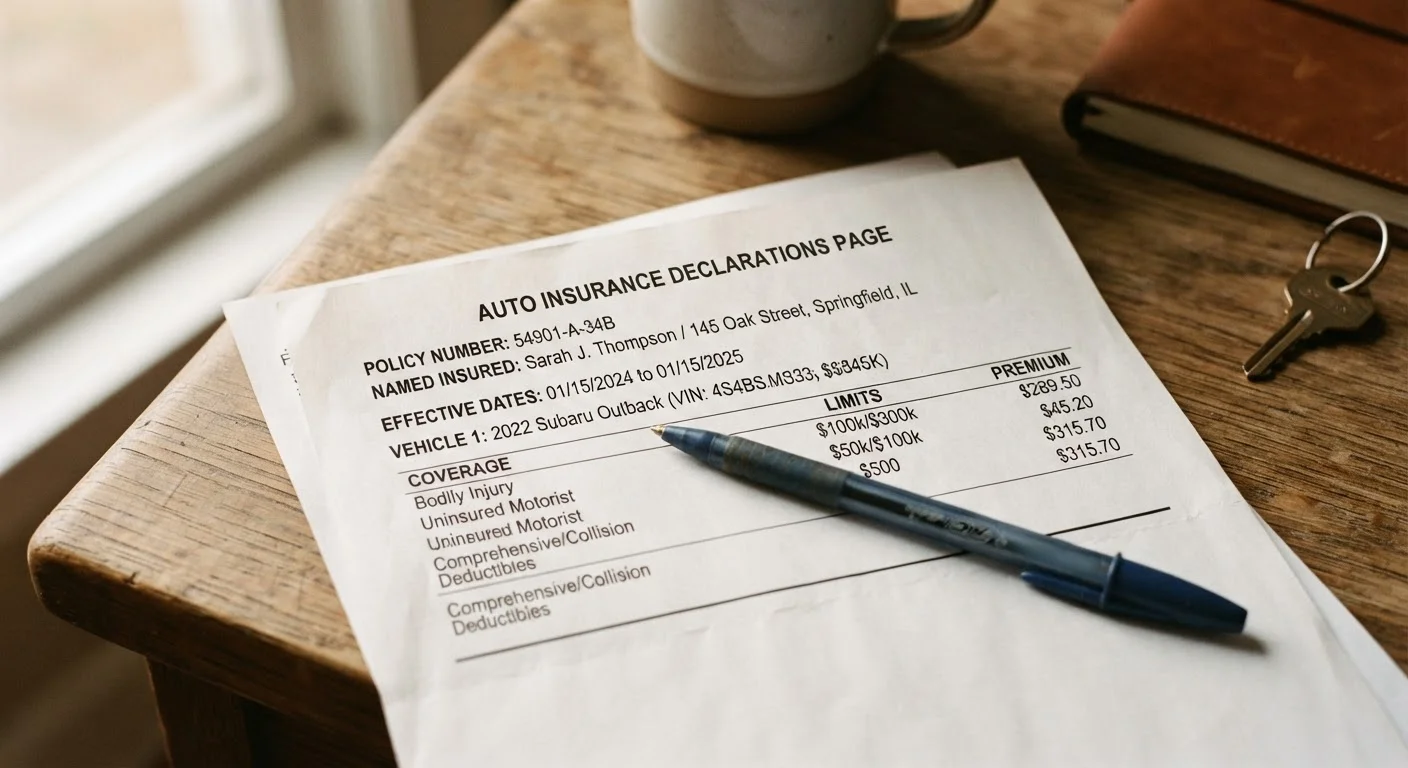
Photo: ReadersChronicle.com | Your Comprehensive Learning Destination editorial
—— In This Article
Key Takeaways
- Your declarations page is a one-to-two page summary of your entire auto insurance policy.
- It lists every coverage type, dollar limits, and deductibles you've selected.
- Errors on the dec page - wrong address or vehicle - can affect whether a claim gets paid.
- Understanding the page helps you spot coverage gaps before you ever need to file a claim.
- You receive a new declarations page each time your policy renews or changes.
What the Declarations Page Is - and Isn't
The declarations page is a condensed snapshot of your auto insurance policy. Think of it as the cover sheet: it tells you who is covered, what vehicles are insured, which coverages you have, and how much each one costs. What it doesn't do is explain every condition, exclusion, or definition - those live in the full policy document, often 20 to 40 pages long.
Most drivers never read the full policy, which is understandable. But skipping the dec page entirely is a real risk. This is the document that tells you exactly what protection you're paying for, and it's the first thing an insurer references when a claim comes in. Misreading it - or never reading it at all - can lead to expensive surprises after an accident.
You'll receive a new dec page at every renewal (typically every six or twelve months) and whenever you make a mid-term change, such as adding a driver or buying a new car. Treat each new version as worth a ten-minute review.
What you will need
How to Work Through the Page Step by Step
The sections below walk you through the dec page in the order most insurers present information. Grab your current dec page before you start - having it in front of you makes each step concrete rather than abstract.
Auto Insurance Declarations Page
The primary document you'll read through and verify during this exercise.
Vehicle Registration or Title
Used to cross-check that the insured vehicle information on the dec page is accurate.
Highlighter or Note-Taking App
Helps you flag sections that need follow-up or contain unfamiliar terms.
Locate your declarations page
Most insurers call this document the declarations page or dec page. It's the first page (sometimes two pages) of your policy packet. If you went paperless, log in to your insurer's portal or app and look for a link labeled Policy Documents or ID Cards & Policy Summary. If you can't find it, call your insurer and ask them to email or mail you a current copy.
Confirm the named insured and policy period
At the very top of the dec page you'll see the named insured - the person (or people) legally on the policy - and the policy period, which shows the exact start and end dates of coverage. Verify your name is spelled correctly and that any other listed drivers are people you intended to add. Check that today's date falls within the policy period so you know your coverage is active.
Review the described vehicle(s)
The dec page lists each insured vehicle by year, make, model, and VIN. Cross-reference the VIN against your registration or the sticker on your dashboard. If you recently bought a car, traded one in, or added a family vehicle, confirm the list reflects your current fleet. A vehicle that isn't listed isn't covered.
Read through the coverage types and limits
This is the core of the dec page. For each vehicle, you'll see a table of coverage types paired with dollar amounts. Common entries include:
- Bodily Injury Liability - written as two numbers such as 50/100, meaning $50,000 per person / $100,000 per accident for injuries you cause to others.
- Property Damage Liability - a single limit covering damage you cause to someone else's property.
- Collision - pays to repair your car after a crash, regardless of fault, minus your deductible.
- Comprehensive - covers non-collision events like theft, fire, or weather damage, minus your deductible.
- Uninsured/Underinsured Motorist - protects you if the at-fault driver has no insurance or not enough.
- Medical Payments or PIP - covers medical costs for you and passengers, regardless of fault.
For a deeper explanation of how liability, collision, and comprehensive interact, see what each coverage actually covers.
Note your deductibles
Deductibles appear next to collision and comprehensive coverage. This is the amount you pay out of pocket before insurance kicks in on a claim. A $500 deductible means you absorb the first $500 of a covered repair. Higher deductibles generally lower your premium; lower deductibles raise it. Make sure the deductible amounts listed match what you agreed to when you set up the policy.
Check for endorsements and discounts
Endorsements (also called riders or add-ons) are optional extras attached to your policy - things like roadside assistance, rental car reimbursement, or gap coverage. They'll appear either within the coverage table or in a separate section. Verify you're paying only for endorsements you actually want. Separately, many dec pages list applied discounts; if you expect a multi-vehicle or safe-driver discount, confirm it's showing up. For a full rundown of common reductions, see common auto insurance discounts.
Confirm the premium and payment schedule
The dec page typically shows your total policy premium and how it's split across installments if you're paying monthly or semi-annually. Verify the total matches what you agreed to when you purchased or renewed. If you're shopping for a new policy, use the dec page as a reference when comparing quotes on equal footing.
Keep Your Dec Page Accessible
Store a digital copy in a folder you can reach from your phone. After a fender-bender, you'll want to reference your coverage and deductibles quickly - not dig through a glove compartment or wait on hold. A screenshot of the coverage summary table alone can be surprisingly useful at the scene.
Unlisted Vehicles Are Not Covered
If you recently purchased or traded in a vehicle and haven't notified your insurer, that vehicle may not appear on your dec page - meaning it could be uninsured. Most policies include a brief grace period for newly acquired vehicles, but the length and conditions vary. Don't assume: contact your insurer as soon as you acquire a new car.
What to Do If Something Looks Wrong
If you spot an error - a misspelled name, a vehicle that shouldn't be listed, a coverage you don't recognize, or a discount that's missing - contact your insurer's customer service line or your agent promptly. Most corrections are straightforward, but some require a policy endorsement to take effect. Keep a record of the date and name of the representative you spoke with, and ask for a revised dec page after any change is made.
If a coverage limit looks lower than you expected, don't assume it's a typo - it may reflect a choice made at enrollment that you've since forgotten. Review it against your original quote documents. When in doubt about whether your current limits make sense for your situation, speaking with a licensed insurance agent is worthwhile. This article provides general educational information about reading a policy document and is not a substitute for advice tailored to your specific circumstances.

Cars Editorial Team
Cars Editorial Team is the collective byline for our editorial team and contributor network. Articles published under this byline or an editorial pen name are researched, written, and reviewed according to our editorial standards for clarity, consistency, and independence before publication.
View author profile